
I have never seen the fox. I have only heard it barking and howling. It sounds like a screaming baby. I only ever hear it when it's dark outside.
This sounds like it's straight out of a horror movie or something.
What would the plot device be?
Lame: Is it mostly harmless?
Cookie-cutter: Would it attack people in the neighborhood one by one? Possibly with rabies?
Overdone: Is it a zombie fox, signaling the beginning of the zombie apocalypse?
I Know What You Did Last Summer: Is it really a demon taking the shape of a fox to haunt the lives of a select few humans?
Seriously though, the way I only occasionally hear it is eerily reminiscent of one of those supernatural mindfuck horror movies.
Friday, December 11, 2009

Wednesday, December 9, 2009
Polynomial update
It's been a while since I originally posted about Polynomial. When I posted that review, version 00c was the latest. Now it's up to version 00h. So naturally some stuff has changed.
Polynomial screenshots and a download link are here.
The game has improved vastly in the sound department, mostly due to the addition of background music. Also, when you kill an enemy and it drops a powerup, there's now a sound for that. It was fairly easy to tell before as the enemy explodes with a different pattern when it drops a powerup, but a sound cue always helps.
It feels more difficult as well. Enemies now have this red-colored projectile (at least I think it's a projectile, maybe it's a suicide enemy) that moves very fast and deals a lot of damage, but can be killed. Even while flying through the fractal it's possible to die if you can't dodge a barrage of them.
As your health gets lower, when you take damage there are video effects similar to those that happen when you die. It's nice to have a visual indicator of low health (in addition to the health bar), but my comment about an audible alarm still stands.
If the difficulty difference isn't apparent, I'll explain it this way. I used to be able to last an hour without dying. Typically at this point the game would be running at about 5 frames per second because it had spawned so many enemies. Those enemies would be locked in a never ending chain reaction of death. In the most recent version, I have yet to make it to this "late game".
With regards to what I said before about waiting for multiplayer, the developer is working on that. Honestly I'd drop the US$20 on it now If I had the money to spare. The Mio figure I preordered has been postponed to January :( Anyway, since full version updates are free and the developer's page basically says "hey, get it now, the price could go up *wink* *wink* *nudge* *nudge*", and multiplayer is in the works.
The only thing I'd suggest is that if the free version gets the multiplayer as well, that it should be compatible with the full version and work over a LAN (i.e. have a mode that isn't dependent on having an internet connection for multiplayer). I've got MAGFest's LAN room on the mind here. If I've got the full version, but I put the free version on the network for people to grab, I'll want to be able to play with them. There's no guarantee that multiplayer will be ready before MAGFest 8 (which is less than a month away!), but, you know, just sayin'...
Polynomial screenshots and a download link are here.
The game has improved vastly in the sound department, mostly due to the addition of background music. Also, when you kill an enemy and it drops a powerup, there's now a sound for that. It was fairly easy to tell before as the enemy explodes with a different pattern when it drops a powerup, but a sound cue always helps.
It feels more difficult as well. Enemies now have this red-colored projectile (at least I think it's a projectile, maybe it's a suicide enemy) that moves very fast and deals a lot of damage, but can be killed. Even while flying through the fractal it's possible to die if you can't dodge a barrage of them.
As your health gets lower, when you take damage there are video effects similar to those that happen when you die. It's nice to have a visual indicator of low health (in addition to the health bar), but my comment about an audible alarm still stands.
If the difficulty difference isn't apparent, I'll explain it this way. I used to be able to last an hour without dying. Typically at this point the game would be running at about 5 frames per second because it had spawned so many enemies. Those enemies would be locked in a never ending chain reaction of death. In the most recent version, I have yet to make it to this "late game".
With regards to what I said before about waiting for multiplayer, the developer is working on that. Honestly I'd drop the US$20 on it now If I had the money to spare. The Mio figure I preordered has been postponed to January :( Anyway, since full version updates are free and the developer's page basically says "hey, get it now, the price could go up *wink* *wink* *nudge* *nudge*", and multiplayer is in the works.
The only thing I'd suggest is that if the free version gets the multiplayer as well, that it should be compatible with the full version and work over a LAN (i.e. have a mode that isn't dependent on having an internet connection for multiplayer). I've got MAGFest's LAN room on the mind here. If I've got the full version, but I put the free version on the network for people to grab, I'll want to be able to play with them. There's no guarantee that multiplayer will be ready before MAGFest 8 (which is less than a month away!), but, you know, just sayin'...
Monday, December 7, 2009
Whaddaya know, a wallpaper update.
Yeah, here's the wallpaper update I foreshadowed. Including the image I used to make my new MAL signature image. One of the K-On! ones I could have detexted the rest of the way but didn't really feel like it. I'd have had to remove all the snowflakes too since they only exist to compliment the text, and this is one of those rare cases where I think the text compliments the wallpaper well.
/w/ has a nice Azusa thread going on right now, so I'm working on filling the Azusa void since 99% of the K-On! wallpapers that have been made were made before she was introduced.
Also, I now have over 100 wallpapers from The Melancholy of Haruhi Suzumiya. Good ones are still popping up...
No tooltips this time, because adding them is really cumbersome.


Is this enough images for you, Dave?
/w/ has a nice Azusa thread going on right now, so I'm working on filling the Azusa void since 99% of the K-On! wallpapers that have been made were made before she was introduced.
Also, I now have over 100 wallpapers from The Melancholy of Haruhi Suzumiya. Good ones are still popping up...
No tooltips this time, because adding them is really cumbersome.
Is this enough images for you, Dave?
Sunday, December 6, 2009
Classic DOS Games: Cosmo's Cosmic Adventure
Partly fueling this series is the website classicdosgames.com. They archive the shareware demos of classic DOS games, link to sites where you can buy the full version, and occasionally attempt to get the developers to release the full games under a freeware license. Many developers have cooperated. It's nice to see people preserving these games.
Anyway, on to Cosmo's Cosmic Adventure.

The game: Link
If you don't already have it: DOSBox
Get yourself set up:
Cosmo's Cosmic Adventure is a sidescrolling platformer. You play as Cosmo, a green alien with suction cup hands. While on your way to Disney World, you and your parents were forced to crash land on a strange planet. You went off exploring while your parents were repairing the ship, and when you came back you discovered that your parents had been abducted. So now it's up to you to go rescue them.
The controls are simple. Left and right move left and right. You can look up and down with, well, up and down. Jump with Control. Throughout the game you will find bombs, these can be used with Alt.
To kill most enemies you just have to jump on them. Some enemies will take multiple hits. There are things that can be blown up with bombs to receive health powerups and other goodies. If you want to cling to a wall, just push towards it while in the air. You can use this with the jump button to scale high walls or get powerups out of pits.
Speaking of powerups, if you're in a high place, try looking up. Often a powerup will fall down. While most powerups simply give you points, there are the occasional health powerups, stars, and bombs. Throughout the game you will find "hint globes" that give you gameplay hints. Press up at any one of these to read the hint.
The music is quite good for a game of this era. In fact, the bonus level background music has stuck in my mind to this day, I still find myself whistling it every now and then.
Even though it's shareware and there's only one episode of the three in the full game, the one episode is still fairly long and has plenty of difficulty. While most of the difficulty is simply trying to figure out where the heck you're supposed to go, the extremely varied types of enemies add to it.
There are secrets everywhere. Plus, there are bonuses that you get for doing various things. The only one they tell you about in the shareware version is that there's a bonus for bombing 15 of the eye plants. Every time you bomb an eye plant it gives you another bomb, so unless there's an unreachable platform right above that eye plant, go for it. If such an unreachable platform exists, the bomb that the eye plant drops will land on that instead of the ground next to you. You get the full list of these bonuses with the full version, though some of them are fairly easy to discover on your own.
Being a platformer means there's plenty of things for you to use as well. There are springboards around that you can use to jump very high. Some enemies are stationary and serve as a temporary bridge between high-up platforms so that you can jump from one to another. Some enemies can't be killed but can be forced to let you pass if you bomb them.
You can use enemies to reach higher places, but it's tricky to pull off. I have the easiest time with the ghosts in the cemetery that won't come after you unless you're facing away from them. They're pretty easy to lure to the exact spot you want them in since you can make them stop simply by turning around. Since they take several hits to kill, you can move them while jumping off of them.
Some surfaces, such as ice, are slippery. You won't be able to stick to them as well with your suction cups. You'll stick just fine, but you'll slide down the wall. This only really comes into play in the later levels.
Here's to hoping that Apogee (now 3D Realms) will release the full version under a freeware license. They've already done so with some of their other games...
Anyway, on to Cosmo's Cosmic Adventure.

The game: Link
If you don't already have it: DOSBox
Get yourself set up:
- Extract Cosmo's Cosmic Adventure. (Mine is in e:\games\cosmo)
- Open your DOSBox install directory.
- Copy dosbox.conf to the directory where you extracted the game and rename it to cosmo.conf.
- Open cosmo.conf and scroll down to the [autoexec] section.
- Copy and paste the following commands in there (after the line # Lines in this section will be run at startup.), then modify it to mount the directory you extracted the game to.
mount c e:\games\cosmo
c:
cosmo1
exit - Save and close the file.
- Create a shortcut to DOSBox and edit its target to have the following command line flags at the end:
-noconsole -conf "e:\games\cosmo\cosmo.conf"
Don't forget to put a space between the existing target and this text. Change the path to cosmo.conf to match yours.
Cosmo's Cosmic Adventure is a sidescrolling platformer. You play as Cosmo, a green alien with suction cup hands. While on your way to Disney World, you and your parents were forced to crash land on a strange planet. You went off exploring while your parents were repairing the ship, and when you came back you discovered that your parents had been abducted. So now it's up to you to go rescue them.
The controls are simple. Left and right move left and right. You can look up and down with, well, up and down. Jump with Control. Throughout the game you will find bombs, these can be used with Alt.
To kill most enemies you just have to jump on them. Some enemies will take multiple hits. There are things that can be blown up with bombs to receive health powerups and other goodies. If you want to cling to a wall, just push towards it while in the air. You can use this with the jump button to scale high walls or get powerups out of pits.
Speaking of powerups, if you're in a high place, try looking up. Often a powerup will fall down. While most powerups simply give you points, there are the occasional health powerups, stars, and bombs. Throughout the game you will find "hint globes" that give you gameplay hints. Press up at any one of these to read the hint.
The music is quite good for a game of this era. In fact, the bonus level background music has stuck in my mind to this day, I still find myself whistling it every now and then.
Even though it's shareware and there's only one episode of the three in the full game, the one episode is still fairly long and has plenty of difficulty. While most of the difficulty is simply trying to figure out where the heck you're supposed to go, the extremely varied types of enemies add to it.
There are secrets everywhere. Plus, there are bonuses that you get for doing various things. The only one they tell you about in the shareware version is that there's a bonus for bombing 15 of the eye plants. Every time you bomb an eye plant it gives you another bomb, so unless there's an unreachable platform right above that eye plant, go for it. If such an unreachable platform exists, the bomb that the eye plant drops will land on that instead of the ground next to you. You get the full list of these bonuses with the full version, though some of them are fairly easy to discover on your own.
Being a platformer means there's plenty of things for you to use as well. There are springboards around that you can use to jump very high. Some enemies are stationary and serve as a temporary bridge between high-up platforms so that you can jump from one to another. Some enemies can't be killed but can be forced to let you pass if you bomb them.
You can use enemies to reach higher places, but it's tricky to pull off. I have the easiest time with the ghosts in the cemetery that won't come after you unless you're facing away from them. They're pretty easy to lure to the exact spot you want them in since you can make them stop simply by turning around. Since they take several hits to kill, you can move them while jumping off of them.
Some surfaces, such as ice, are slippery. You won't be able to stick to them as well with your suction cups. You'll stick just fine, but you'll slide down the wall. This only really comes into play in the later levels.
Here's to hoping that Apogee (now 3D Realms) will release the full version under a freeware license. They've already done so with some of their other games...
Friday, December 4, 2009
Classic DOS Games: Sledrider
I posted about DOSBox a while ago but I haven't really touched on anything I actually use it for... until now. This will be a series of posts about the stuff I'm running in DOSBox.
First up is Sledrider.
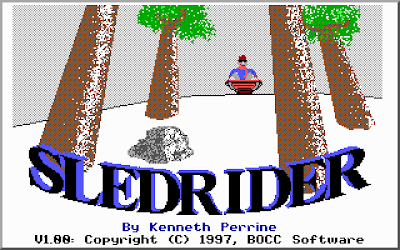
Since the very first screen you see when you start up the game says "This game may be freely distributed", I'll hook you up with some links.
Sledrider: Download (180KB, shouldn't take too long)
DOSBox: Website
Get yourself set up: (this may take a little bit, but it's a one-time deal)
The game will sound like ass until you set the sound to Sound Blaster. Accept its default options for IRQ and port, they should work in DOSBox.
The controls are simple. By default, up accelerates, down brakes, left steers clockwise, and right steers counterclockwise. I don't really like this, so I change it so that up is brake, down accelerates, left steers counterclockwise, and right steers clockwise. If you set your steering up one way, but then after you start playing you realize it's just not going to work, you can hit F3 to swap your steering controls.
Go to Info to get the gameplay overview, though I'll summarize it here. Basically there are obstacles like bushes, rocks, signs, fences, and other people. You'll want to avoid these. There are good things like ice cream cones, lollipops, and money that you'll want to pick up. The goal of each level is simply to reach the end of the level.
If you hit an obstacle, your sled will take damage, and when you take too much damage you lose a sled. Lose all your sleds and the game is over. You can find wrenches strategically placed in some levels that will repair your sled, and you get a new sled every 5000 points.
A point of interest is that you get points for and don't take damage from hitting the snowball-throwing kids. Their snowballs will damage you, of course, but hitting the kid doesn't. Every time you hit one of the kids they shout "Hey!" I usually try to hit as many as I can.
The music in the game only plays before the beginning of each level. Once you move your sled, it stops. This is kinda weird, but maybe the developer thought it might be too distracting while you're trying to dodge obstacles. Other games with obstacles to dodge have background music that isn't distracting, but whatever.
The game is 30 levels long and there is a lot of variety in those levels. When you've gotten through them all, you can set the difficulty to Expert and go through again. Expert makes the hills steeper, so you accelerate faster and carry more speed. You'll need to use the brakes a lot more in order to survive each level.
Sledrider is pretty fun, especially for a free game.
First up is Sledrider.

Since the very first screen you see when you start up the game says "This game may be freely distributed", I'll hook you up with some links.
Sledrider: Download (180KB, shouldn't take too long)
DOSBox: Website
Get yourself set up: (this may take a little bit, but it's a one-time deal)
- Install DOSBox.
- Extract Sledrider. (Mine is in e:\games\sledride)
- Open the sledride.conf file in Notepad.
- Scroll all the way down to the [autoexec] section at the very bottom.
- Change the line mount c e:\games\sledride so that the path points to where you extracted Sledrider. For example, if you extracted it to c:\sledride, you would change it to mount c c:\sledride.
- Save and close Notepad. You won't need to make any further changes to sledride.conf.
- Now make a shortcut to DOSBox and name it Sledrider. You can put this shortcut anywhere. I recommend putting it in the Start menu somewhere.
- Right click on that shortcut and select Properties.
- In the Target: box, at the end of the line, hit space and then add -noconsole -conf "e:\games\sledride\sledride.conf". Change the path to sledride.conf to point to where your sledride.conf is.
- Hit OK.
The game will sound like ass until you set the sound to Sound Blaster. Accept its default options for IRQ and port, they should work in DOSBox.
The controls are simple. By default, up accelerates, down brakes, left steers clockwise, and right steers counterclockwise. I don't really like this, so I change it so that up is brake, down accelerates, left steers counterclockwise, and right steers clockwise. If you set your steering up one way, but then after you start playing you realize it's just not going to work, you can hit F3 to swap your steering controls.
Go to Info to get the gameplay overview, though I'll summarize it here. Basically there are obstacles like bushes, rocks, signs, fences, and other people. You'll want to avoid these. There are good things like ice cream cones, lollipops, and money that you'll want to pick up. The goal of each level is simply to reach the end of the level.
If you hit an obstacle, your sled will take damage, and when you take too much damage you lose a sled. Lose all your sleds and the game is over. You can find wrenches strategically placed in some levels that will repair your sled, and you get a new sled every 5000 points.
A point of interest is that you get points for and don't take damage from hitting the snowball-throwing kids. Their snowballs will damage you, of course, but hitting the kid doesn't. Every time you hit one of the kids they shout "Hey!" I usually try to hit as many as I can.
The music in the game only plays before the beginning of each level. Once you move your sled, it stops. This is kinda weird, but maybe the developer thought it might be too distracting while you're trying to dodge obstacles. Other games with obstacles to dodge have background music that isn't distracting, but whatever.
The game is 30 levels long and there is a lot of variety in those levels. When you've gotten through them all, you can set the difficulty to Expert and go through again. Expert makes the hills steeper, so you accelerate faster and carry more speed. You'll need to use the brakes a lot more in order to survive each level.
Sledrider is pretty fun, especially for a free game.
Wednesday, December 2, 2009
My Unending Search
Before I finally break down and write my own wallpaper rotator, I figure it's best if I search around some more and see if anything's popped up that fills my requirements.
From a random thread on /w/ I found out about WallPapa, so I installed it and set it up with my wallpapers and played around with it for a little while. Its user interface is way better than Winwall's, primarily because it's resizable and not tiny.
The first thing I looked for, it actually had: resampling the wallpaper while preserving its aspect ratio. Set it to "stretch" and it will fill the screen, preserving aspect ratio. It also has a setting for the background color to use when letterboxing/pillarboxing, as would be expected. It defaults to black, which is what I want, so I didn't have to change it.
Importing directories is really easy. You just click the add button and select the directory. It'll ask you if you want to include subfolders, and then it'll go about looking for every image it can find. Unfortunately, there doesn't seem to be a way to import a directory structure and then selectively exclude certain files or folders within it, which is necessary for me since I have two subdirectories containing images that I don't want to be set as my wallpaper.
So I manually imported all the subdirectories of my wallpaper folder. This would have gone faster if it had an option for "always include subdirectories" so I wouldn't have to select the directory and then hit yes once for each directory.
So now I have the wallpaper list populated with everything I've got. Scrolling through I noticed something strange: it groups files together not alphabetically by filename like one would expect, but alphabetically by file extension, then alphabetically by filename. So all the JPEGs are together, then the PNGs. This is likely due to how it's searching for the files, looking for each extension one at a time and neglecting to sort the results together.
All set, right? I hit Change Wallpaper. It only does things sequentially in the order that they're in the list, but it has a button to randomize the order of the list, so whatever. Then I actually look at the wallpaper. Its resampling is horrible. All the lines are jagged everywhere. It's like it's passing it to Windows' resampler instead of using GD or anything else that's better. I'd actually like to be able to look at my wallpaper without saying to myself "shit that's ugly".
I haven't yet contacted the developer with my concerns, so if I do that maybe there's hope.
Since I like the program overall, I'll do as I did for Polynomial and list some constructive criticisms:
From a random thread on /w/ I found out about WallPapa, so I installed it and set it up with my wallpapers and played around with it for a little while. Its user interface is way better than Winwall's, primarily because it's resizable and not tiny.
The first thing I looked for, it actually had: resampling the wallpaper while preserving its aspect ratio. Set it to "stretch" and it will fill the screen, preserving aspect ratio. It also has a setting for the background color to use when letterboxing/pillarboxing, as would be expected. It defaults to black, which is what I want, so I didn't have to change it.
Importing directories is really easy. You just click the add button and select the directory. It'll ask you if you want to include subfolders, and then it'll go about looking for every image it can find. Unfortunately, there doesn't seem to be a way to import a directory structure and then selectively exclude certain files or folders within it, which is necessary for me since I have two subdirectories containing images that I don't want to be set as my wallpaper.
So I manually imported all the subdirectories of my wallpaper folder. This would have gone faster if it had an option for "always include subdirectories" so I wouldn't have to select the directory and then hit yes once for each directory.
So now I have the wallpaper list populated with everything I've got. Scrolling through I noticed something strange: it groups files together not alphabetically by filename like one would expect, but alphabetically by file extension, then alphabetically by filename. So all the JPEGs are together, then the PNGs. This is likely due to how it's searching for the files, looking for each extension one at a time and neglecting to sort the results together.
All set, right? I hit Change Wallpaper. It only does things sequentially in the order that they're in the list, but it has a button to randomize the order of the list, so whatever. Then I actually look at the wallpaper. Its resampling is horrible. All the lines are jagged everywhere. It's like it's passing it to Windows' resampler instead of using GD or anything else that's better. I'd actually like to be able to look at my wallpaper without saying to myself "shit that's ugly".
I haven't yet contacted the developer with my concerns, so if I do that maybe there's hope.
Since I like the program overall, I'll do as I did for Polynomial and list some constructive criticisms:
- Rather than the "shuffle" button reordering the list, it should make the program randomly choose a wallpaper from the list. This way the list can stay sorted.
- Speaking of sorting, fix it so it's not sorted by file extension.
- An "exclude file/subdirectory" option is a must for recursive imports.
- Rather than prompting every time to ask if the directory import should be recursive, have an option for it.
- Automatically scanning imported directories for new images would be great. I'm not sure if it does this or not because I didn't specifically test it, but it does have an option for manually rescanning the directories.
- Do resampling with the GD library so it's actually pleasing to the eye.
Monday, November 30, 2009
Convenience, or the lack thereof
Frozen convenience foods are great for when you need food and you don't really feel like cooking. They shouldn't be consumed with great regularity due to their general lack of regard for nutrition, but they're good to have around. I'm thinking primarily skillet meals here. We keep a few skillet meals in the freezer as "emergency meals" to be cooked when nobody really feels like doing actual cooking.
We've been stocking the Stouffer's skillet meals, which are really easy to make. Get out your skillet, add contents of the bag, heat according to directions, then serve and eat. It doesn't need to be any more complicated than that, right?
Well, TGI Friday's thinks it should be more complex.
We've been ignoring the TGI Friday's skillet meals because they're more expensive and they have fewer varieties. But a few days ago we were given one (story largely irrelevant) and decided to make it.
Open up its bag and what do you have? Several smaller bags. There's a bag of sauce that needs to be thawed in a bowl of warm water, and bags for other individual ingredients, generally separating the meat from everything else. The directions say "Easy as 1-2-3!" but closer inspection reveals that their three steps are made up of sub-steps as you heat one part, then add the others in.
Portion-wise, the TGI Friday's skillet meals have smaller servings than the Stouffer's ones. They also generate a lot more trash, as you have to throw out all of the bags that were in the main bag, in addition to the main bag itself. With the Stouffer's ones, you only have one bag to toss out when you're done.
I like TGI Friday's as a restaurant. I like their boxed convenience items. But their skillet meals aren't convenient. What's wrong with just combining everything together like Stouffer's does?
They also tell you to confirm that the internal temperature is 165°F. I've already ranted about this, but... ovens and cooktops are way more consistent than microwaves, so there's no excuse for not knowing if your directions will get the internal temperature to the right level. Having to get out a thermometer and measure that isn't convenient at all.
The moral of the story: Stouffer's skillet meals are awesome.
We've been stocking the Stouffer's skillet meals, which are really easy to make. Get out your skillet, add contents of the bag, heat according to directions, then serve and eat. It doesn't need to be any more complicated than that, right?
Well, TGI Friday's thinks it should be more complex.
We've been ignoring the TGI Friday's skillet meals because they're more expensive and they have fewer varieties. But a few days ago we were given one (story largely irrelevant) and decided to make it.
Open up its bag and what do you have? Several smaller bags. There's a bag of sauce that needs to be thawed in a bowl of warm water, and bags for other individual ingredients, generally separating the meat from everything else. The directions say "Easy as 1-2-3!" but closer inspection reveals that their three steps are made up of sub-steps as you heat one part, then add the others in.
Portion-wise, the TGI Friday's skillet meals have smaller servings than the Stouffer's ones. They also generate a lot more trash, as you have to throw out all of the bags that were in the main bag, in addition to the main bag itself. With the Stouffer's ones, you only have one bag to toss out when you're done.
I like TGI Friday's as a restaurant. I like their boxed convenience items. But their skillet meals aren't convenient. What's wrong with just combining everything together like Stouffer's does?
They also tell you to confirm that the internal temperature is 165°F. I've already ranted about this, but... ovens and cooktops are way more consistent than microwaves, so there's no excuse for not knowing if your directions will get the internal temperature to the right level. Having to get out a thermometer and measure that isn't convenient at all.
The moral of the story: Stouffer's skillet meals are awesome.
Subscribe to:
Posts (Atom)