
- Chrono Fever (Chrono Trigger → Radical Dreamers → Chrono Cross):
- Chrono Trigger (PSX): Beaten, Extras Mode fully unlocked, everyone level 99 with max power/magic/speed, enough copies of the best equipment so that I don't have to do equipment swaps
- Chrono Trigger (SNES): Beaten, everyone level 99 with max power/magic/speed, enough copies of the best equipment so that I don't have to do equipment swaps
- Chrono Trigger (DS): Have all techs for everyone but Magus, advancing story to where I get Magus
- Radical Dreamers: Died on Lynx with no savestate, haven't retried
- Chrono Cross: Not started
- Secret of Mana-thon: Dropped due to grind
- Project 'Bout Fuckin' Time (Link's Awakening DX → Final Fantasy 4):
- Link's Awakening DX: Beaten
- Final Fantasy 4: Not started
- Simpsons Hit and Run: Dropped due to in-game time limits being too strict
- Bravely Default: Norende completed a long time ago with about 45 citizens. Able to defeat lower-level Nemeses reliably. Have the elusive Japanese Elixir Mammon. Ready to continue with story.
- PC Games:
- Half-Life 1: Beaten
- Half-Life: Blue Shift: Beaten
- Half-Life: Opposing Force: Dropped due to infinite spawns leaving no room to retreat
- Half-Life 2 and episodes: Not started
- Commander Keen "Complete" Pack: stalled on Commander Keen 2
- Aquaria: a key item I need is finite and I've used all I obtained, will probably try to just hack my save file to add in just enough (justified since the item IS FUCKING FINITE)
- Torchlight: Had mods installed, had to reinstall OS, forgot which mods I had installed, haven't picked back up as a result
- Dungeons of Dredmor: semi-stalled, I go back to it every now and then
- Hell Yeah!: stuck on final boss
- Magicka: Have all DLC, haven't gotten back to 100% achievements yet (missing a few in Dungeons and Daemons, and haven't touched Dungeons and Gargoyles)
- Beat Hazard: I need to get better at the game to get back to 100% achievements
- Castle Crashers: Replaying periodically just to play the characters I skipped in my epic quest to unlock as much as I could, plus I almost think I can defeat the Thieves' Forest boss on Insane Mode now
- BattleBlock Theater: Still going strong
- Mitsurugi Kamui Hikae: stalled
- Ether Vapor Remaster: stalled
- Fairy Bloom Freesia: main story beaten, guardian mode stalled
- Chantelise: stalled due to not being able to restart on the one mission that's giving me trouble because you have to complete all missions in a given area in one go and the camera x axis is inverted from what I want it to be
Showing posts with label Classic DOS Games. Show all posts
Showing posts with label Classic DOS Games. Show all posts
Thursday, May 29, 2014
Gaming Projects Status Update
Any new/different information in this post overrides anything stated in previous posts.

Tuesday, December 28, 2010
Classic DOS Games: Commander Keen Episode One: Marooned on Mars
Oh yeah, now we're talking.

This game (and its entire series) are available as a pack on Steam for $4.99 outside of a sale. That's right, 5 classic DOS games for $5. Go get it now. It's ok, I'll wait.
This game (and its entire series) are available as a pack on Steam for $4.99 outside of a sale. That's right, 5 classic DOS games for $5. Go get it now. It's ok, I'll wait.
Sunday, May 16, 2010
Classic DOS Games: Windows 3.1? Waitaminute...
Yeah, Windows 3.1 runs quite well in DOSBox.

Just to stay on the safe side of legality, I can't offer a download link.
Setting it up takes a little work. With the right drivers you can get actual semi-decent video modes. I have it running 1024x768 with 16 bit color. The resolution can go higher, but my monitor doesn't go much higher... lol ancient CRT
Anyway, everything you remember about Windows 3.1 is there, because, it IS Windows 3.1. Just in case you think you forget, I'll mention Hotdog Stand and canyon.mid.
Here's a screenshot of me not actually using the Hotdog Stand theme (it's deliciously eyebleeding), but I am listening to canyon.mid.

And here's a screenshot of me using the Hotdog Stand theme, but not listening to canyon.mid.

While Windows 3.1 technically isn't a game, it does come with Solitaire and Minesweeper (which you already have installed in your undoubtedly more recent version of Windows), and if you install the Win32s addon that allows it to run 32 bit programs, you'll have Freecell (which again you probably already have).
However, if you have old 16 bit Windows games that act weirdly in a more recent version of Windows, this is the perfect environment to run them in. Unfortunately I don't believe networking works in Windows 3.1 under DOSBox. Also notably absent is scroll wheel support. Welcome back to the good old days, when mice maybe had two buttons, were blocky non-ergonomic devices, and connected via 9-pin serial ports.

Just to stay on the safe side of legality, I can't offer a download link.
Setting it up takes a little work. With the right drivers you can get actual semi-decent video modes. I have it running 1024x768 with 16 bit color. The resolution can go higher, but my monitor doesn't go much higher... lol ancient CRT
Anyway, everything you remember about Windows 3.1 is there, because, it IS Windows 3.1. Just in case you think you forget, I'll mention Hotdog Stand and canyon.mid.
Here's a screenshot of me not actually using the Hotdog Stand theme (it's deliciously eyebleeding), but I am listening to canyon.mid.

And here's a screenshot of me using the Hotdog Stand theme, but not listening to canyon.mid.

While Windows 3.1 technically isn't a game, it does come with Solitaire and Minesweeper (which you already have installed in your undoubtedly more recent version of Windows), and if you install the Win32s addon that allows it to run 32 bit programs, you'll have Freecell (which again you probably already have).
However, if you have old 16 bit Windows games that act weirdly in a more recent version of Windows, this is the perfect environment to run them in. Unfortunately I don't believe networking works in Windows 3.1 under DOSBox. Also notably absent is scroll wheel support. Welcome back to the good old days, when mice maybe had two buttons, were blocky non-ergonomic devices, and connected via 9-pin serial ports.
Tuesday, December 29, 2009
Classic DOS Games: The 7th Guest
I've mentioned running this game in DOSBox a couple times, but here's a post dedicated to it.

Since this is a full retail game with no demo, I can't just provide you with a link to obtain it. I'm trying to stay legal with these posts.
A few important notes pertinent to running this game in DOSBox:
The story of The 7th Guest, though laced with inconsistencies, goes somewhat like this. Henry Stauf was a poor man who had resorted to crime. One night he dreamt of a doll. When he woke up, he remembered the doll and created it. He gave it to a bartender who said his daughter might like it. Then he dreamt of another toy and made that. People loved his toys, and so he built a business around them.
Then, defying any remaining sense of logic, a virus hit and killed lots of children, who died clutching their Stauf toys.
There was one more dream, of a mansion that Stauf eventually built. This is where the game is set.
The cinematics are all of past events that took place within Stauf's mansion, and the people you see are rendered brightly and slightly translucently, giving them the appearance of ghosts. This is only one small element of the horror. Everything about this game tries to creep you out. People's faces will turn into skulls, there's blood everywhere, and plenty of things happen suddenly.
The core gameplay is a point and click free roaming puzzle game, kind of like Myst except a lot creepier. The comparison to Myst brings up another point: all of the graphics in the game are beautiful for a game of its age, due to the fact that they're all prerendered. Today's computers would have no problem rendering the Stauf mansion in real time, but back when this game was released, the only way to get graphics of this caliber was to prerender them.
As you explore the mansion, you'll discover the puzzles. There's one in each room, and you have a map that uses shading to tell you which rooms are accessible and which rooms you've solved a puzzle in. To aid you in getting around the mansion, there are secret passageways everywhere. One of my favorites is the pocket of the pool table in the game room that takes you to the inside of the oven in the kitchen. I'll leave the rest for you to discover.
Below the house is a giant crypt. It's very easy to get lost in if you don't know the way. There's a puzzle you have to solve just to enter it, and a puzzle to solve at the end of it as well. Somewhere in the mansion you can find a map of it, you might be wise to look for it and maybe jot it down or take a screenshot (Ctrl + F5 in DOSBox).
Most of the puzzles are fairly standard puzzles, ranging from placing eight queens on a chess board such that none can capture any of the others, to rearranging cans that have letters on them to figure out what the message is, to more cryptic things like turning lights on in a toy building in a certain pattern. In at least one of the puzzles you're actually playing against Stauf. The most notoriously difficult puzzle in the game is the microscope puzzle. I personally have yet to beat Stauf on this puzzle, but it is possible.
If you get stuck, the book on the table in the library will give you hints. Using it three times will solve the puzzle for you. So if you really just want to turn your brain off, you can just use the book to progress through the game.
As you go through the game, it's only natural that you may find that you really like one or two of the puzzles and want to do them again. Fortunately, there is a way to do this without having to start the game over and get back to that point again, or anything else weird or cumbersome. After you beat the game, it creates an open house save where you can explore the house freely and solve any puzzle you want.
Speaking of saves, you can save at any given time. You can't save puzzle progress, but it'll reload you right at that puzzle. You get plenty of save slots, so if someone else wants to start the game from the beginning just have them use a separate slot. The slots are numbered, but when you choose one you can give it a name.
The mouse pointers add to the creepiness too. Your basic mouse pointer is a skeleton hand. It will wag a finger when you can't do anything, it will beckon when you can go somewhere, and it'll turn into a skull with moving eyes and pulsating brain when you find a puzzle. There are eyeball cursors as well that show up when you're selecting things to move or place or use in a puzzle.
I often confuse elements (particularly the puzzles) of The 7th Guest with those of its sequel, The 11th Hour. Both are set in Stauf's mansion, but the puzzles are all different and The 11th Hour has a lot more stuff to do. I'll touch on The 11th Hour in a later post, though I will say this now: even though they're still prerendered, The 11th Hour's graphics are much better.

Since this is a full retail game with no demo, I can't just provide you with a link to obtain it. I'm trying to stay legal with these posts.
A few important notes pertinent to running this game in DOSBox:
- I find that I have to increase the cycles to about 10000 with Ctrl + F12 for the game to run smoothly. You can set this in your config file so you don't have to do it every time you start the game up, this is even easier if you have separate config files for each game like I do.
- The game will capture your mouse pointer when you click, so press Ctrl + F10 if you need it back.
- Since the game is on two CDs and you will need to switch partway through the game, if you're running it using .iso images (as I am) you can mount both of them at once and swap when appropriate using Ctrl + F4. Inspect the usage of the imgmount command. Again, you can set this up in your config file if you have separate config files for each game.
The story of The 7th Guest, though laced with inconsistencies, goes somewhat like this. Henry Stauf was a poor man who had resorted to crime. One night he dreamt of a doll. When he woke up, he remembered the doll and created it. He gave it to a bartender who said his daughter might like it. Then he dreamt of another toy and made that. People loved his toys, and so he built a business around them.
Then, defying any remaining sense of logic, a virus hit and killed lots of children, who died clutching their Stauf toys.
There was one more dream, of a mansion that Stauf eventually built. This is where the game is set.
The cinematics are all of past events that took place within Stauf's mansion, and the people you see are rendered brightly and slightly translucently, giving them the appearance of ghosts. This is only one small element of the horror. Everything about this game tries to creep you out. People's faces will turn into skulls, there's blood everywhere, and plenty of things happen suddenly.
The core gameplay is a point and click free roaming puzzle game, kind of like Myst except a lot creepier. The comparison to Myst brings up another point: all of the graphics in the game are beautiful for a game of its age, due to the fact that they're all prerendered. Today's computers would have no problem rendering the Stauf mansion in real time, but back when this game was released, the only way to get graphics of this caliber was to prerender them.
As you explore the mansion, you'll discover the puzzles. There's one in each room, and you have a map that uses shading to tell you which rooms are accessible and which rooms you've solved a puzzle in. To aid you in getting around the mansion, there are secret passageways everywhere. One of my favorites is the pocket of the pool table in the game room that takes you to the inside of the oven in the kitchen. I'll leave the rest for you to discover.
Below the house is a giant crypt. It's very easy to get lost in if you don't know the way. There's a puzzle you have to solve just to enter it, and a puzzle to solve at the end of it as well. Somewhere in the mansion you can find a map of it, you might be wise to look for it and maybe jot it down or take a screenshot (Ctrl + F5 in DOSBox).
Most of the puzzles are fairly standard puzzles, ranging from placing eight queens on a chess board such that none can capture any of the others, to rearranging cans that have letters on them to figure out what the message is, to more cryptic things like turning lights on in a toy building in a certain pattern. In at least one of the puzzles you're actually playing against Stauf. The most notoriously difficult puzzle in the game is the microscope puzzle. I personally have yet to beat Stauf on this puzzle, but it is possible.
If you get stuck, the book on the table in the library will give you hints. Using it three times will solve the puzzle for you. So if you really just want to turn your brain off, you can just use the book to progress through the game.
As you go through the game, it's only natural that you may find that you really like one or two of the puzzles and want to do them again. Fortunately, there is a way to do this without having to start the game over and get back to that point again, or anything else weird or cumbersome. After you beat the game, it creates an open house save where you can explore the house freely and solve any puzzle you want.
Speaking of saves, you can save at any given time. You can't save puzzle progress, but it'll reload you right at that puzzle. You get plenty of save slots, so if someone else wants to start the game from the beginning just have them use a separate slot. The slots are numbered, but when you choose one you can give it a name.
The mouse pointers add to the creepiness too. Your basic mouse pointer is a skeleton hand. It will wag a finger when you can't do anything, it will beckon when you can go somewhere, and it'll turn into a skull with moving eyes and pulsating brain when you find a puzzle. There are eyeball cursors as well that show up when you're selecting things to move or place or use in a puzzle.
I often confuse elements (particularly the puzzles) of The 7th Guest with those of its sequel, The 11th Hour. Both are set in Stauf's mansion, but the puzzles are all different and The 11th Hour has a lot more stuff to do. I'll touch on The 11th Hour in a later post, though I will say this now: even though they're still prerendered, The 11th Hour's graphics are much better.
Sunday, December 6, 2009
Classic DOS Games: Cosmo's Cosmic Adventure
Partly fueling this series is the website classicdosgames.com. They archive the shareware demos of classic DOS games, link to sites where you can buy the full version, and occasionally attempt to get the developers to release the full games under a freeware license. Many developers have cooperated. It's nice to see people preserving these games.
Anyway, on to Cosmo's Cosmic Adventure.

The game: Link
If you don't already have it: DOSBox
Get yourself set up:
Cosmo's Cosmic Adventure is a sidescrolling platformer. You play as Cosmo, a green alien with suction cup hands. While on your way to Disney World, you and your parents were forced to crash land on a strange planet. You went off exploring while your parents were repairing the ship, and when you came back you discovered that your parents had been abducted. So now it's up to you to go rescue them.
The controls are simple. Left and right move left and right. You can look up and down with, well, up and down. Jump with Control. Throughout the game you will find bombs, these can be used with Alt.
To kill most enemies you just have to jump on them. Some enemies will take multiple hits. There are things that can be blown up with bombs to receive health powerups and other goodies. If you want to cling to a wall, just push towards it while in the air. You can use this with the jump button to scale high walls or get powerups out of pits.
Speaking of powerups, if you're in a high place, try looking up. Often a powerup will fall down. While most powerups simply give you points, there are the occasional health powerups, stars, and bombs. Throughout the game you will find "hint globes" that give you gameplay hints. Press up at any one of these to read the hint.
The music is quite good for a game of this era. In fact, the bonus level background music has stuck in my mind to this day, I still find myself whistling it every now and then.
Even though it's shareware and there's only one episode of the three in the full game, the one episode is still fairly long and has plenty of difficulty. While most of the difficulty is simply trying to figure out where the heck you're supposed to go, the extremely varied types of enemies add to it.
There are secrets everywhere. Plus, there are bonuses that you get for doing various things. The only one they tell you about in the shareware version is that there's a bonus for bombing 15 of the eye plants. Every time you bomb an eye plant it gives you another bomb, so unless there's an unreachable platform right above that eye plant, go for it. If such an unreachable platform exists, the bomb that the eye plant drops will land on that instead of the ground next to you. You get the full list of these bonuses with the full version, though some of them are fairly easy to discover on your own.
Being a platformer means there's plenty of things for you to use as well. There are springboards around that you can use to jump very high. Some enemies are stationary and serve as a temporary bridge between high-up platforms so that you can jump from one to another. Some enemies can't be killed but can be forced to let you pass if you bomb them.
You can use enemies to reach higher places, but it's tricky to pull off. I have the easiest time with the ghosts in the cemetery that won't come after you unless you're facing away from them. They're pretty easy to lure to the exact spot you want them in since you can make them stop simply by turning around. Since they take several hits to kill, you can move them while jumping off of them.
Some surfaces, such as ice, are slippery. You won't be able to stick to them as well with your suction cups. You'll stick just fine, but you'll slide down the wall. This only really comes into play in the later levels.
Here's to hoping that Apogee (now 3D Realms) will release the full version under a freeware license. They've already done so with some of their other games...
Anyway, on to Cosmo's Cosmic Adventure.

The game: Link
If you don't already have it: DOSBox
Get yourself set up:
- Extract Cosmo's Cosmic Adventure. (Mine is in e:\games\cosmo)
- Open your DOSBox install directory.
- Copy dosbox.conf to the directory where you extracted the game and rename it to cosmo.conf.
- Open cosmo.conf and scroll down to the [autoexec] section.
- Copy and paste the following commands in there (after the line # Lines in this section will be run at startup.), then modify it to mount the directory you extracted the game to.
mount c e:\games\cosmo
c:
cosmo1
exit - Save and close the file.
- Create a shortcut to DOSBox and edit its target to have the following command line flags at the end:
-noconsole -conf "e:\games\cosmo\cosmo.conf"
Don't forget to put a space between the existing target and this text. Change the path to cosmo.conf to match yours.
Cosmo's Cosmic Adventure is a sidescrolling platformer. You play as Cosmo, a green alien with suction cup hands. While on your way to Disney World, you and your parents were forced to crash land on a strange planet. You went off exploring while your parents were repairing the ship, and when you came back you discovered that your parents had been abducted. So now it's up to you to go rescue them.
The controls are simple. Left and right move left and right. You can look up and down with, well, up and down. Jump with Control. Throughout the game you will find bombs, these can be used with Alt.
To kill most enemies you just have to jump on them. Some enemies will take multiple hits. There are things that can be blown up with bombs to receive health powerups and other goodies. If you want to cling to a wall, just push towards it while in the air. You can use this with the jump button to scale high walls or get powerups out of pits.
Speaking of powerups, if you're in a high place, try looking up. Often a powerup will fall down. While most powerups simply give you points, there are the occasional health powerups, stars, and bombs. Throughout the game you will find "hint globes" that give you gameplay hints. Press up at any one of these to read the hint.
The music is quite good for a game of this era. In fact, the bonus level background music has stuck in my mind to this day, I still find myself whistling it every now and then.
Even though it's shareware and there's only one episode of the three in the full game, the one episode is still fairly long and has plenty of difficulty. While most of the difficulty is simply trying to figure out where the heck you're supposed to go, the extremely varied types of enemies add to it.
There are secrets everywhere. Plus, there are bonuses that you get for doing various things. The only one they tell you about in the shareware version is that there's a bonus for bombing 15 of the eye plants. Every time you bomb an eye plant it gives you another bomb, so unless there's an unreachable platform right above that eye plant, go for it. If such an unreachable platform exists, the bomb that the eye plant drops will land on that instead of the ground next to you. You get the full list of these bonuses with the full version, though some of them are fairly easy to discover on your own.
Being a platformer means there's plenty of things for you to use as well. There are springboards around that you can use to jump very high. Some enemies are stationary and serve as a temporary bridge between high-up platforms so that you can jump from one to another. Some enemies can't be killed but can be forced to let you pass if you bomb them.
You can use enemies to reach higher places, but it's tricky to pull off. I have the easiest time with the ghosts in the cemetery that won't come after you unless you're facing away from them. They're pretty easy to lure to the exact spot you want them in since you can make them stop simply by turning around. Since they take several hits to kill, you can move them while jumping off of them.
Some surfaces, such as ice, are slippery. You won't be able to stick to them as well with your suction cups. You'll stick just fine, but you'll slide down the wall. This only really comes into play in the later levels.
Here's to hoping that Apogee (now 3D Realms) will release the full version under a freeware license. They've already done so with some of their other games...
Friday, December 4, 2009
Classic DOS Games: Sledrider
I posted about DOSBox a while ago but I haven't really touched on anything I actually use it for... until now. This will be a series of posts about the stuff I'm running in DOSBox.
First up is Sledrider.
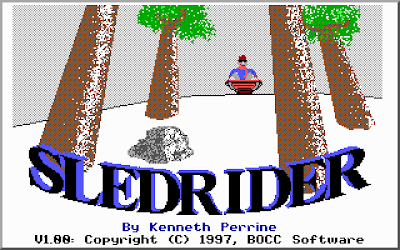
Since the very first screen you see when you start up the game says "This game may be freely distributed", I'll hook you up with some links.
Sledrider: Download (180KB, shouldn't take too long)
DOSBox: Website
Get yourself set up: (this may take a little bit, but it's a one-time deal)
The game will sound like ass until you set the sound to Sound Blaster. Accept its default options for IRQ and port, they should work in DOSBox.
The controls are simple. By default, up accelerates, down brakes, left steers clockwise, and right steers counterclockwise. I don't really like this, so I change it so that up is brake, down accelerates, left steers counterclockwise, and right steers clockwise. If you set your steering up one way, but then after you start playing you realize it's just not going to work, you can hit F3 to swap your steering controls.
Go to Info to get the gameplay overview, though I'll summarize it here. Basically there are obstacles like bushes, rocks, signs, fences, and other people. You'll want to avoid these. There are good things like ice cream cones, lollipops, and money that you'll want to pick up. The goal of each level is simply to reach the end of the level.
If you hit an obstacle, your sled will take damage, and when you take too much damage you lose a sled. Lose all your sleds and the game is over. You can find wrenches strategically placed in some levels that will repair your sled, and you get a new sled every 5000 points.
A point of interest is that you get points for and don't take damage from hitting the snowball-throwing kids. Their snowballs will damage you, of course, but hitting the kid doesn't. Every time you hit one of the kids they shout "Hey!" I usually try to hit as many as I can.
The music in the game only plays before the beginning of each level. Once you move your sled, it stops. This is kinda weird, but maybe the developer thought it might be too distracting while you're trying to dodge obstacles. Other games with obstacles to dodge have background music that isn't distracting, but whatever.
The game is 30 levels long and there is a lot of variety in those levels. When you've gotten through them all, you can set the difficulty to Expert and go through again. Expert makes the hills steeper, so you accelerate faster and carry more speed. You'll need to use the brakes a lot more in order to survive each level.
Sledrider is pretty fun, especially for a free game.
First up is Sledrider.

Since the very first screen you see when you start up the game says "This game may be freely distributed", I'll hook you up with some links.
Sledrider: Download (180KB, shouldn't take too long)
DOSBox: Website
Get yourself set up: (this may take a little bit, but it's a one-time deal)
- Install DOSBox.
- Extract Sledrider. (Mine is in e:\games\sledride)
- Open the sledride.conf file in Notepad.
- Scroll all the way down to the [autoexec] section at the very bottom.
- Change the line mount c e:\games\sledride so that the path points to where you extracted Sledrider. For example, if you extracted it to c:\sledride, you would change it to mount c c:\sledride.
- Save and close Notepad. You won't need to make any further changes to sledride.conf.
- Now make a shortcut to DOSBox and name it Sledrider. You can put this shortcut anywhere. I recommend putting it in the Start menu somewhere.
- Right click on that shortcut and select Properties.
- In the Target: box, at the end of the line, hit space and then add -noconsole -conf "e:\games\sledride\sledride.conf". Change the path to sledride.conf to point to where your sledride.conf is.
- Hit OK.
The game will sound like ass until you set the sound to Sound Blaster. Accept its default options for IRQ and port, they should work in DOSBox.
The controls are simple. By default, up accelerates, down brakes, left steers clockwise, and right steers counterclockwise. I don't really like this, so I change it so that up is brake, down accelerates, left steers counterclockwise, and right steers clockwise. If you set your steering up one way, but then after you start playing you realize it's just not going to work, you can hit F3 to swap your steering controls.
Go to Info to get the gameplay overview, though I'll summarize it here. Basically there are obstacles like bushes, rocks, signs, fences, and other people. You'll want to avoid these. There are good things like ice cream cones, lollipops, and money that you'll want to pick up. The goal of each level is simply to reach the end of the level.
If you hit an obstacle, your sled will take damage, and when you take too much damage you lose a sled. Lose all your sleds and the game is over. You can find wrenches strategically placed in some levels that will repair your sled, and you get a new sled every 5000 points.
A point of interest is that you get points for and don't take damage from hitting the snowball-throwing kids. Their snowballs will damage you, of course, but hitting the kid doesn't. Every time you hit one of the kids they shout "Hey!" I usually try to hit as many as I can.
The music in the game only plays before the beginning of each level. Once you move your sled, it stops. This is kinda weird, but maybe the developer thought it might be too distracting while you're trying to dodge obstacles. Other games with obstacles to dodge have background music that isn't distracting, but whatever.
The game is 30 levels long and there is a lot of variety in those levels. When you've gotten through them all, you can set the difficulty to Expert and go through again. Expert makes the hills steeper, so you accelerate faster and carry more speed. You'll need to use the brakes a lot more in order to survive each level.
Sledrider is pretty fun, especially for a free game.
Subscribe to:
Posts (Atom)